Splash
A Shopify theme for luxury swimming pool and outdoor living stores. Pools, hot tubs, equipment, and the quote only work that a cart cannot take.
Splash 1.0.0 is finished and is being prepared for Shopify Theme Store review. It is not on sale yet. There is no approval date to give, so none is printed here.
Splash / v1.0.0 / $280 / not yet on sale
What it looks like
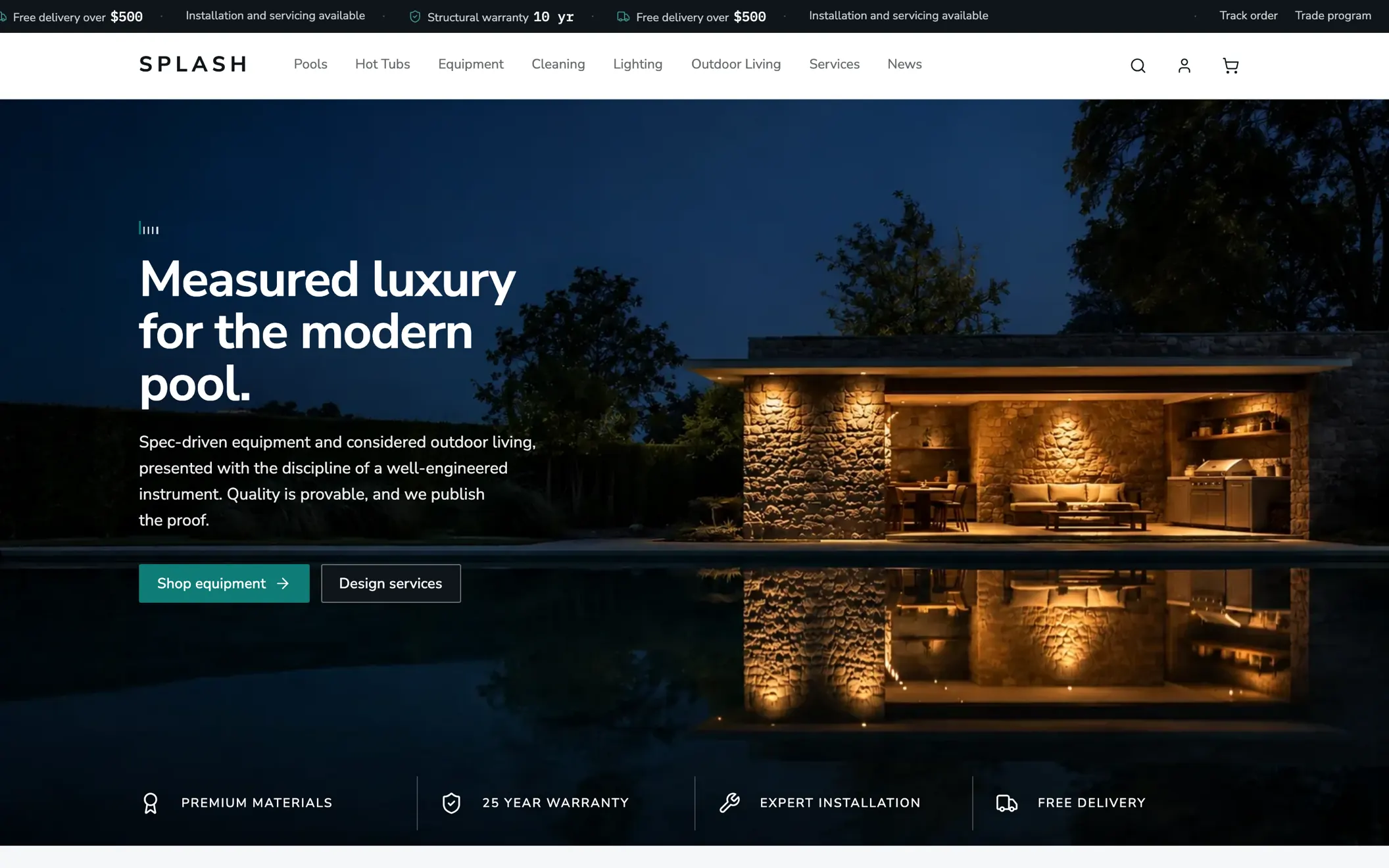
Home / 1440 x 900 / Chromium 151 / 126 KB / 2026-08-15
What it does
Quote requests instead of a cart.
Tag a product with a word you choose, and the whole buy stack on that product is replaced wherever it appears: no price, no quantity, no accelerated checkout, and a request that leads to your own quote page. The form there branches on the answers: any field can be set to appear only after a particular answer to another one. The demo form ships one such field, and you build as many as the job needs.
Specification tables fed by metafields.
Choose three metafields once in theme settings and they print as specification rows on the product cards, across collection, search, featured products and recommendations. The product page has its own blocks, taking up to eight table rows and three comparison bars, each pointed at whichever metafield you choose. A product carrying no value for a spec has that row left out rather than printed empty.
Filters that still reach a phone.
Below 990 pixels the filter and sort controls leave the flow and pin to the foot of the window, each opening a sheet. Left in the flow they have scrolled away by the second row of cards.
A certifications band that ships empty.
The section's own preset is four blank marks, so adding it yourself asserts nothing. The home page that ships with the theme does carry four filled example credentials, which are demo content and are meant to be replaced with your own.
A testimonial ledger with no stars.
Each quote carries the particulars of the job it refers to, the town and the year, in the same monospace register the specification tables use. There is no star rating and no review structured data, because a rating a merchant types in is not a rating anyone gave.
The measurements, in full
Lighthouse, desktop
| Measure | Result | Dev | Range (5 runs) | Source |
|---|---|---|---|---|
| Performance, home | 99 | −1 | 98 to 100 | No single cause was identified. The figure moves by a point between batches. |
| Performance, collection | 100 | ±0 | 100 to 100 | |
| Performance, product | 100 | ±0 | 99 to 100 | |
| Accessibility, home | 100 | ±0 | 100 to 100 | |
| Accessibility, collection | 100 | ±0 | 100 to 100 | |
| Accessibility, product | 97 | −3 | 97 to 97 | Shopify's own Buy it now button, white on its branded blue at 3.59:1. Themes are not permitted to alter that button's colours. |
| SEO, three page types | 100 | ±0 | 100 to 100 | |
| Best practices | 78 | −22 | 78 to 78 | Shopify's own third party cookie for Shop Pay and Shop accounts, set on shop.app. A theme cannot remove it. |
Lighthouse, median of 5 / published theme / 2026-08-14
Lighthouse, mobile
| Measure | Result | Dev | Range (5 runs) | Source |
|---|---|---|---|---|
| Performance, home | 85 | −15 | 45 to 90 | Mobile Lighthouse is not a precise instrument here. The store is remote, the run is throttled on top of real latency, and the timeline is simulated rather than observed. |
| Performance, collection | 85 | −15 | 59 to 89 | |
| Performance, product | 84 | −16 | 81 to 93 | |
| Accessibility, home and collection | 100 | ±0 | 100 to 100 | |
| Accessibility, product | 97 | −3 | 97 to 97 | The same Buy it now button. |
| Best practices | 79 | −21 | 79 to 79 | The same shop.app cookie. |
| SEO, three page types | 100 | ±0 | 100 to 100 |
These are the worst figures on this site and they are published at the same size as the best ones. A median with no range is a rounded up number, which is why the range is a column and not a footnote. These figures are the settled run of 2026-08-13. Mobile was measured again on 2026-08-14, immediately after a release, and returned 65 on the home page against 93 and 95 on collection and product. That home figure is not published as the headline because a deploy resets Shopify's learned early hints and it was observed climbing 65, then 70, then 81 across successive batches with no code change at all. Both runs are stated here rather than the flattering one, and the figure is retaken once the edge has settled.
Lighthouse, median of 5 / published theme / 2026-08-13
Validation, browsers and audits
| Measure | Result | Dev | Source |
|---|---|---|---|
| schema.org vocabulary errors | 0 | count, no target | Across 23 page types: 533 typed nodes and 1,914 property uses, resolved against the published vocabulary rather than through a hosted service. |
| Theme authored HTML errors | 0 | count, no target | Nu Markup Checker 26.8.6, run offline. Twenty four errors remain across the 20 pages, every one inside markup Shopify injects. |
| Theme check offenses | 0 | count, no target | 88 files, Shopify CLI 4.6.1, with no configuration file suppressing any check. |
| Browser engines rendered and tested on | 3 | count, no target | Blink, WebKit and Gecko. Add to cart and the cart drawer were exercised on each, and checkout was reached from the cart on each. No order was placed. |
| Surfaces with contrast measured | 12 | count, no target | At two widths, against the pixels actually painted behind each glyph, including the states that only exist once a drawer or a panel is open. |
| Theme authored contrast failures | 0 | count, no target | About 1,400 text nodes. The only failure anywhere is Shopify's Buy it now button. |
| Keyboard purchase flows completed | 1 | count, no target | Walked with real key presses, from the skip link to checkout, including the cart drawer's focus trap and its return. |
| JavaScript asset files in the theme | 0 | count, no target | The assets directory is one stylesheet and two SVG files. |
A hosted validator that has started refusing requests returns the same zero as a clean run, so both checkers are run locally and both print how much they examined above their total. That is why the counts above are stated beside the zeros.
Local checkers / 20 page types / 2026-08-14
The measurements that are not perfect
Accessibility on the product page, 97, three below target.
The deduction is Shopify's own Buy it now button, white on its branded blue at 3.59:1. Theme code is forbidden to alter that button's colours, so this cannot be fixed inside the theme and it stays at 97.
Best practices, 78, twenty two below target.
The deduction is Shopify's own third party cookie for Shop Pay, set on shop.app, and a theme cannot remove it. The figure was 74 in the first audit, when a missing favicon was failing a second audit alongside it. That half was the theme's and fixing it moved the number to 78, which is where it stays until Shopify changes the rest.
Performance on mobile, 84 to 85, about fifteen below target.
Roughly 300 KB of Shopify script loads on every page. Its blocking time on the collection page ranged from 14 milliseconds to 1.66 seconds across five runs, and the worst of those is the run that scored 59. The theme's own images total 54 to 60 KB on collection and product, and 691 KB on the home page, which is the page with the widest spread. Some of this is fixable and some of it is not.
This section exists because a row of perfect scores invites the question of what was left out. Nothing here is styled differently from the good numbers: same table, same ink, same size.
What it does not do
No countdown timers and no invented scarcity.
Shopify's own rules forbid fictitious urgency. Stock figures appear on product cards, and they are your store's real inventory number, printed only where Shopify is actually tracking that variant. The product page states availability in words rather than a count.
No star rating a merchant can type in.
Ratings come from a review app's metafields or not at all. Point the two rating settings at your app and the product structured data reports what customers actually gave, which is why there is no box in the theme editor to invent one.
No page builder.
Sections are configured, not composed. If a store needs a drag and drop canvas, this is the wrong theme.
No theme owned tracking.
Nothing in the theme calls a third party server, and there is no analytics beyond what Shopify itself installs.
What a merchant needs
A Shopify store.
No developer, and no build tooling on your machine. The theme is installed from the Theme Store and configured in the theme editor.
Shopify's Search & Discovery app, for filters.
Free, and made by Shopify. Storefront filters are configured there rather than in the theme, so without it the collection and search pages have no filter rail. This is how Shopify's filtering works and is not specific to Splash.
Three product metafields, if you want specification tables.
Defined once in Settings, Custom data, Products, and exposed to the storefront. Three global keys drive the product cards; the product page's own blocks take up to eight rows and three bars, so you can point at more than three if you have them. Everything else in the theme works without any.
Updates are free. Every release is remeasured and the figures on this page move with it, in either direction. Ask a question before you buy if something here is unclear.